BATCH LABEL GUIDE
Numbered labels.
CSV lists. Less retyping.
Prepare a consistent batch for bins, equipment, shelves, ports or your own text list. Each row uses the current design’s cartridge, font, alignment and size. Review the plan before printing.
A sequence for more than cables
Try BIN {n}, EQ {n}, SHELF {n} or PORT {n}. The app screenshots below show an INPUT sequence; the same number placeholder works in your own text. Make separate batches for different cartridge materials.
Create a numbered sequence
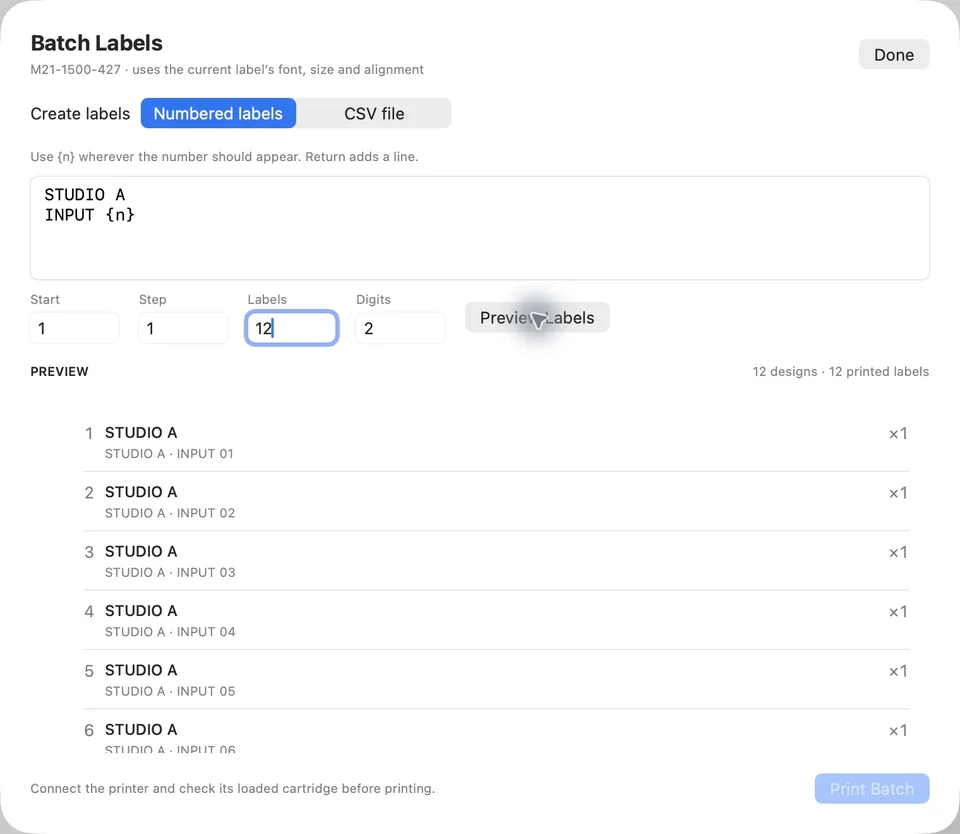
Open File → Batch Labels (⇧⌘B). Select Numbered labels and put {n} wherever the number should appear. Return adds a line.
BIN {n}| Setting | Example | Result |
|---|---|---|
| Start | 1 | The first number |
| Step | 1 | Increase by one |
| Labels | 12 | Twelve designs |
| Digits | 2 | 01, 02 … 12 |
Choose Preview Labels to build the plan. Check the first and last identifiers and the total copies. Changing inputs invalidates the preview; generate a fresh plan before printing.
Import a CSV list
Choose CSV file in Batch Labels and select a UTF-8 CSV. The header must include text. Optional columns are name and copies. Copies default to one.
text,name,copies
SCREWS,Parts bin,1
EQ 024,Equipment ID,1
CHARGERS,Accessory box,1
Quoted text can include line breaks or commas. Double a quote inside a quoted value. Invalid rows reject the import rather than partially adding the list.
Download the mixed-project CSV ↓Review before printing
- Check every design and the total number of labels, including copies.
- The batch supports up to 1,000 designs and 1,000 printed labels including copies.
- Connect the M211 and match the loaded cartridge to the design.
- Check one physical label on new stock before printing more.
Labels are sent as sequential single-label jobs. A failure, disconnect, cancellation, or uncertain result stops the batch. Nothing is automatically retried. Stopping cannot retract material already sent, so check the physical output before preparing another batch.