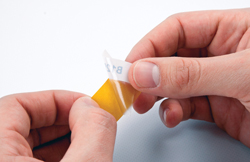
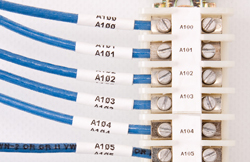
SELF-LAMINATING VINYL · B-427
Wrap it. Protect it.
A printed area identifies the cable. The clear tail wraps over the text for protection. Useful for network runs and cables you handle often.
 VDK LabelCraftComing soon
 NATIVE MAC DESKTOP APP · FOR THE BRADY M211
From a single cable to a whole rack.
Design clear labels, find the right cartridge, and turn a list into a ready-to-review batch.
Apple silicon · macOS 15 or later · Mac App Store launch planned
Actual screenshots from the current Mac app. Animations cycle through real app states; no physical print is shown.
Native Mac Desktop App
✳99 cartridge profiles
✳Numbered & CSV batches
✳PNG & PDF export
FROM YOUR SCREEN TO THE CABLE
Identify a connection at a glance.
Choose the material that fits the job.
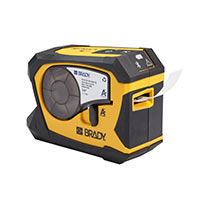
THE PRINTER BEHIND YOUR LABELS
LabelCraft brings label design to your Mac and connects to the Brady M211 over Bluetooth. The compact printer uses M21 cartridges, with materials for cable wraps, flags, sleeves, and everyday identification.
LabelCraft is the Mac app. The printer and label cartridges are sold separately.
Explore the M211 at Brady ↗SELF-LAMINATING VINYL · B-427
A printed area identifies the cable. The clear tail wraps over the text for protection. Useful for network runs and cables you handle often.
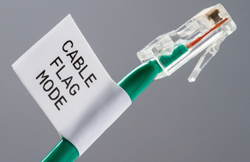
NYLON CLOTH · B-499
Flexible stock can wrap a cable or form a readable flag. Give a connection a clear name without having to follow it all the way back.
HEAT-SHRINK SLEEVES · B-342
Print a sleeve, slide it onto the wire before termination, and shrink it according to the material instructions. Numbered IDs help keep a panel organized.
Product and material photos © Brady Worldwide, Inc. Source: Brady’s M21 material guide ↗. Material examples shown are Brady reference photos, not LabelCraft print samples. VDK LabelCraft is independent of Brady.
TAKE A CLOSER LOOK
Explore the real interface.
Choose a view, then enlarge it for the details.
Write multiline text, adjust size and alignment, and preview the printable area. For continuous stock, fit the design length to your text. Self-laminating profiles also show the clear protective wrap.
LESS REPEATING. MORE GETTING IT DONE.
Let LabelCraft handle the repetition.
Keep the final review in your hands.
Choose a starting number, step, count, and zero padding. The batch uses your current label’s cartridge, font, size, and alignment to create a consistent series.
STUDIO A
INPUT {n}Start 1 · Step 1
12 labels · 2 digits
Illustrative labels above. The animation shows the actual batch preview.
| name | text | copies |
|---|---|---|
| Audio interface | STUDIO A ↵ INPUT 01 | 1 |
| Network rack | NETWORK ↵ RACK A | 1 |
| Workshop drawer | WORKSHOP ↵ SMALL PARTS | 1 |
Bring in a UTF-8 CSV with a text column. Add optional name and copies columns, and quote text that spans multiple lines. Review every entry in the app before printing.
A numbered template or CSV list.
Check the designs and total copies.
Match the loaded M211 cartridge.
Sequential jobs. Cancel to stop.
Batch plans support up to 1,000 labels including copies. Changing the inputs requires a fresh preview. Printing stops on a disconnect, failure, cancellation, or uncertain result.
THE DETAILS THAT MAKE IT USEFUL
Make a design once.
Keep it ready for the next project.
Multiline text, adjustable type, bold, and left, center or right alignment. Automatic fitting helps keep your text inside the printing area.
Save, duplicate, and rename designs on your Mac. Unsaved edits stay with their label when you switch projects or close the app.
Export PNG artwork or a physical-size PDF guide. Editable JSON exports let you move designs between libraries.
Search 99 M21 profiles by part number, material, or size. Designs remember the selected cartridge; connected printers are checked for a match.
Library backups preserve previous versions. Recover unsaved drafts, undo a library deletion, and keep your useful designs close at hand.
Printer Setup & Calibration helps adjust placement for a printer and cartridge. Start with one test label whenever you change stock.
A LITTLE PREVIEW OF THE POSSIBILITIES
Try some text. Pick a style.
Imagine a little more order.
A simple website demo. The Native Mac Desktop App includes cartridge-aware layouts and printer controls.
YOUR MAC. YOUR PRINTER. YOUR WORKFLOW.
Designed for the way you work at your desk.
A native Mac interface, a local label library,
and a Bluetooth connection to your M211.
macOS 15 or later
Connects over Bluetooth. Printer and materials sold separately.
Continuous tape, self-laminating wraps, heat-shrink sleeves, and pre-sized labels. Check placement with a test label when using new stock.
A LITTLE MORE ORDER IS ON ITS WAY.
Coming soon to the Mac App Store
The App Store listing is being prepared.
We’ll add the download link here when the app is available.
BEFORE YOU MAKE YOUR MARK
Not yet. VDK LabelCraft is being prepared for the Mac App Store at a planned price of $9.95 USD. There is no confirmed release date. The download link will appear on this site when it is available.
LabelCraft is built for the Brady M211 over Bluetooth. Other Brady printer models are not currently supported. The printer and label cartridges are purchased separately.
Yes. The app includes numbered sequences and CSV import for batches. You can preview the batch plan before printing. You can also save, duplicate, and export individual designs.
The current Mac version is designed for Apple silicon and macOS 15 or later. This launch does not include an Intel Mac, iPhone, iPad, or Windows version.
No. VDK LabelCraft is an independent application. Brady and M211 are trademarks of their respective owners. No affiliation or endorsement is implied.